
Teams & operations
Who Follows Up on Website Inquiries? A Practical Process for Small Teams
Give website inquiries a clear owner, response plan and next action. Use a practical handoff checklist to keep small-team follow-up organized.
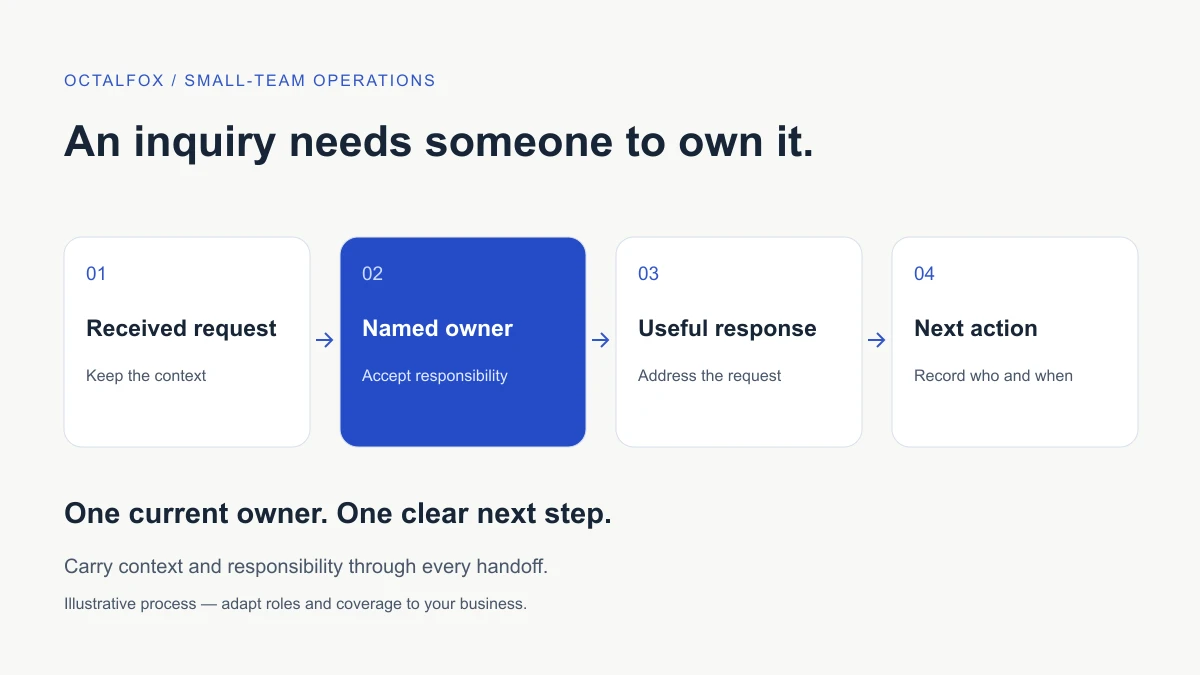
Every website inquiry needs a named owner who is responsible for the next action. A shared inbox can hold the message, but it cannot decide who will reply, what information is missing or when someone should check again. Define those responsibilities before adding more tools or increasing the number of inquiries coming in.
For a small team, a useful starting point is one shared record, one current owner and one dated next action for each open request. This guide explains how to set that up, handle exceptions and decide when a more structured system is needed.
Start where the inquiry reaches the business
Choose one route, such as the main website contact form. Confirm where accepted requests appear and who checks that destination during agreed working hours. Include a backup person for absences and a route for reporting delivery failures.
Separate a received inquiry from a qualified opportunity. A request may be a customer question, a supplier approach, spam or a service inquiry outside your scope. Someone must review it before the business treats it as a potential sale.
Write a short operating rule: “The inbox coordinator checks new requests during our stated coverage hours, assigns an owner and flags anything outside the agreed scope.” Replace the role and coverage with arrangements your team can actually maintain.
If you have several forms or booking destinations, the digital presence audit checklist can help you list them. Start with one route that matters rather than trying to reorganize every channel at once.
Give each request one current owner
The owner is accountable for moving the inquiry forward. They may ask someone else for information, but the request should not become unowned while that happens.
| Responsibility | What the person does | Evidence in the record |
|---|---|---|
| Intake coordinator | Checks new requests and assigns them | Receipt time, category and assigned owner |
| Inquiry owner | Reviews context, replies and records the next step | Last response and next action date |
| Specialist or approver | Answers a specific question or approves a commitment | Decision, conditions and approval status |
| Backup owner | Covers an absence or escalated delay | Accepted handoff and remaining actions |
One person may hold several roles. The point is to make responsibility visible, including who can approve prices, scope, availability or other commitments. An administrator can coordinate a request without having authority to promise delivery.
For an illustrative example, a prospective client asks whether your team can rebuild a website before an event. The coordinator assigns the request to the project lead. The lead gathers requirements, asks the delivery team about capacity and keeps ownership until an approved reply is sent. Forwarding the email alone does not complete that handoff.
Keep a small, useful inquiry record
Use the business system your team can maintain reliably. A shared inbox plus a restricted register may be enough initially. Keep the original conversation accessible and avoid creating conflicting versions of the same request in several spreadsheets.
Record only the information needed to coordinate the work:
- A reference linking to the original inquiry.
- When it arrived and which route it used.
- The request type and current status.
- The current owner and backup route.
- The last meaningful response or decision.
- The next action, responsible person and due date.
- The eventual outcome and reason for closing it.
Keep customer information within approved business systems and limit access to the people who need it. A general performance dashboard does not need the full message or personal contact details.
Salesforce’s lead implementation planning guidance describes defining the lead process and fields before setup. The practical lesson applies even without that product: decide what your team needs to know before building the register.
Make statuses describe the next decision
Use a few statuses with clear meanings. Too many stages can make a simple process harder to maintain; vague labels such as “ongoing” hide what needs attention.
| Example status | Meaning | Next decision |
|---|---|---|
| New | Received, awaiting initial review | Who should own it? |
| Assigned | An owner has accepted responsibility | What response or information is needed? |
| Waiting for our team | An internal answer or approval is outstanding | Who must act, and by when? |
| Waiting for requester | A specific question or proposal has been sent | When should the owner review the request again? |
| Next step agreed | A meeting, quote or other action is arranged | Who will complete it? |
| Closed | No further action is currently planned | Has the outcome been recorded? |
Adapt these labels to your business. Define whether a confirmed project moves into a separate delivery process, and who accepts it there. Closing the inquiry record should not erase an outstanding commitment.
Agree a response plan the team can keep
Set an internal response target based on coverage hours, workload and the type of inquiry. Distinguish an automated acknowledgement from a useful human response. Do not claim a universal ideal response time or promise round-the-clock service if the team cannot provide it.
A useful first reply addresses the person’s request, explains what you can confirm and asks for the information needed to continue. If a specialist must review it, state the next step and an achievable update time. Avoid invented pricing or availability in templates.
Where practical, make the website’s confirmation message agree with this process. If requests are reviewed on working days, make that clear. If the team needs extra time, update the requester rather than silently letting the target pass.
Replace reminders with specific next actions
“Follow up later” gives the next person little context. “Check whether the requester has sent the page inventory on Thursday” identifies the reason and timing.
When someone has not replied, review the original request and your last message before contacting them again. Decide what would make another message useful. Stop or close the task when the person declines, asks not to be contacted or no longer needs the service. Any promotional outreach beyond responding to the inquiry needs separate consideration under the rules relevant to your audience.
For open requests, review three queues: unassigned items, overdue actions and items waiting on your own team. A request waiting for an internal decision should not be mistaken for a customer who has gone quiet.
Make handoffs explicit
A handoff should transfer context and responsibility together. Before changing the owner, include a short summary of the request, what has been promised, what remains unresolved and the next action date. The receiving person should accept the handoff.
Use this checklist for absences, specialist review or a transition into delivery:
- The original request and latest conversation are accessible.
- The requester’s goal and relevant constraints are summarized.
- Approved commitments are separated from open questions.
- A named person has accepted the next action.
- The date and escalation route are recorded.
If nobody can accept the request, escalate it to the process owner. Moving it into another folder is not a substitute for resolving missing capacity or authority.
Decide when tools or automation will help
A shared inbox may remain suitable while ownership and next steps are clear. Consider a CRM when several people need a consistent view of conversations, assignments and open actions, or when duplicate records and missed handoffs keep recurring.
HubSpot’s lead management documentation illustrates assigning and reassigning lead owners in a CRM. Product capabilities and subscription requirements vary; use your actual workflow to evaluate a tool rather than assuming every package supports the same process.
Automate stable steps first: creating a record, notifying the assigned person or reminding an owner about an overdue action. Test duplicate submissions, failed notifications, an absent owner and a requester replying before a reminder runs. Keep someone responsible for exceptions and provide a way to pause the automation.
An integration can move information between tools. It cannot supply missing approval rules or decide what your business should promise. If that coordination is the problem, define the process before commissioning the integration.
Review the process with a small weekly check
Choose a review cadence that fits your volume. Look at unassigned requests, overdue actions, internal waiting time and outcomes. Show counts alongside any percentages, and agree whether response timing uses elapsed time or business hours.
Use the review to identify a concrete fix. Repeated approval delays may need a clearer decision-maker. Repeated missing details may need a better first reply. Duplicate replies may indicate unclear ownership. More messages sent does not by itself show that the process is working better.
OctalFox’s back-office and administrative support can help define recurring coordination, records and handoffs within an agreed scope. Where the process is already clear, business automation may support repeatable steps. To discuss a starting point, share one inquiry route and the handoff that is difficult to manage.